IFS Tools: a small module that saves minutes every day
A small, self-contained browser tool that turns hundreds of item codes copied from Excel into an IFS search, SQL IN or OR filter in seconds.
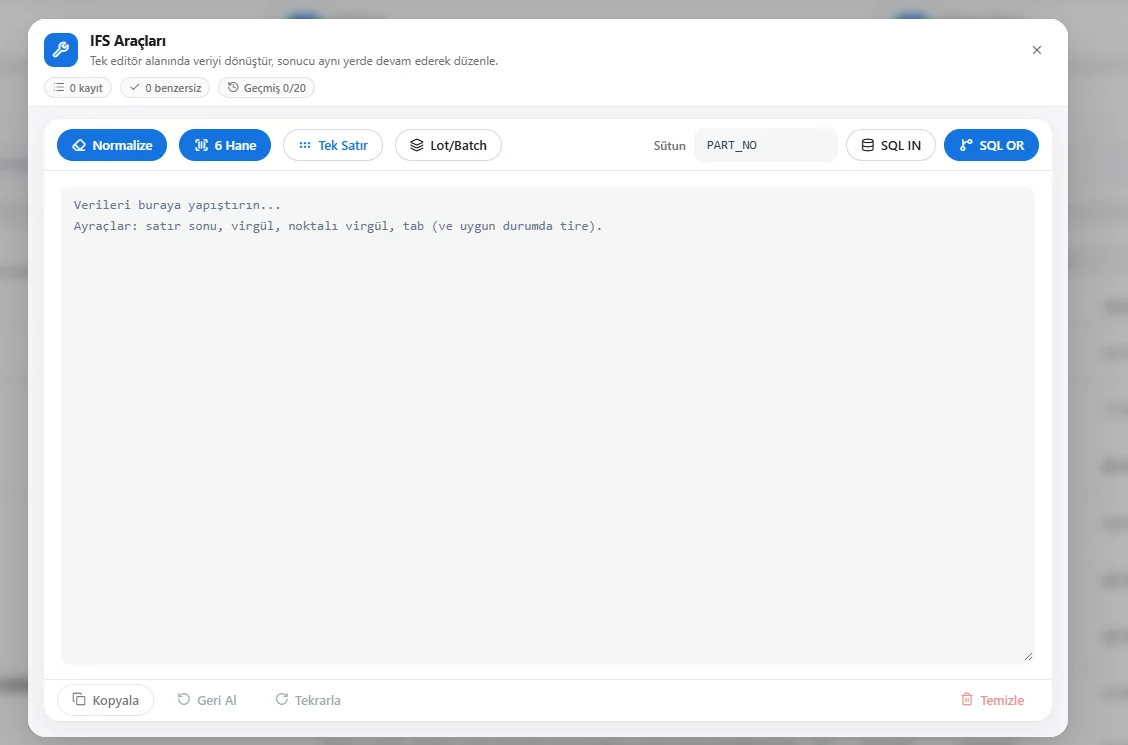
Some developments stay in the shadow of big projects, yet they are the ones used most every day. IFS Tools is one of them: a window with a single text area and six buttons. In return, it removes a chore that costs everyone from planning to the warehouse, from purchasing to accounting, a few minutes every day when searching in IFS.
The problem: getting a list into IFS
Users usually start with a list: products in a customer’s e-mail, item codes filtered in Excel, lot numbers from a stock count. Searching that list in IFS always involves the same manual steps:
- Codes copied from Excel have lost their leading zeros. An item stored as
000123appears as123and is not found in IFS. - The list is one value per line, but the IFS search field expects multiple values on a single line separated by semicolons.
- The list contains duplicates, empty lines and extra spaces; some values are lowercase, some uppercase.
- Anyone writing a report or query needs the same list again as
IN ('...', '...'), with all the quotes.
Each step is small on its own. Done dozens of times a day with hundreds of lines, it becomes both a time sink and a source of errors.
The solution: one editor, six transformations
IFS Tools brings all of this into a single editor. The user pastes the list, clicks a button and the result appears in the same area, ready for the next transformation.
- Normalize: Fixes spacing, drops empty lines and removes duplicates case-insensitively. It reports how many duplicates were removed.
- 6 Digits: Pads item codes to a fixed length with leading zeros and produces a single semicolon-separated line ready for IFS search.
- Single Line: Turns a list separated by lines, commas or tabs into a single line for IFS multi-value search.
- Lot/Batch: Keeps lot and batch numbers that contain dashes intact; here the dash is part of the value, not a separator.
- SQL IN: Turns the list into an
IN (...)expression with quotes escaped. - SQL OR: Turns the list into a
COLUMN = '...' OR ...chain for the chosen column. Oracle limits anINlist to 1000 elements (ORA-01795); an OR chain does not hit that limit.
Example:
Input (from Excel)       6 Digits                    SQL IN
123                      000123;004581;000077        IN ('000123', '004581', '000077')
4581
77
123
Small but careful
The value of the tool is not only in the transformations, but in the details that keep users from making mistakes:
- Live counters. While typing, the number of records, unique records, duplicates and empty lines are shown instantly. Users know that the 250 codes they are looking for really are 250 before running anything.
- Suggestions. The list is analysed and the most suitable transformation is suggested with a reason: normalize first if there are duplicates, lot/batch if values contain dashes, 6 digits if codes are short and alphanumeric.
- SQL safety. Single quotes are escaped in SQL output; records with risky patterns such as comment markers or semicolons trigger a warning. Column names may contain valid characters only.
- Undo and redo. The last 20 actions can be undone. Clicking the wrong button costs nothing.
A self-contained module
IFS Tools was deliberately kept small:
- Nothing goes to a server. All transformations happen in the browser; nothing is stored, no database connection is made and nothing is written to IFS. That is why it needs no separate permission design or security review.
- It opens where you are. Chosen from the menu, it does not navigate to a new page; it opens as a window on top of the current screen and closes with Esc. Users prepare their list without leaving the planning screen.
- It has no dependencies. It works on its own and is not affected by changes in other modules.
Conclusion
In enterprise software, productivity often comes not from big projects but from removing the small tasks repeated a hundred times a day. IFS Tools is a component of a few hundred lines; yet it removes the daily friction of searching lists in IFS.